[et_pb_section fb_built=”1″ admin_label=”Get Started” _builder_version=”4.16″ _module_preset=”71274510-c16b-4161-aafb-60955ad67d11″ custom_padding=”0px||||false|false” saved_tabs=”all” global_colors_info=”{}”][et_pb_row use_custom_gutter=”on” gutter_width=”2″ _builder_version=”4.16″ _module_preset=”default” max_width=”1700px” custom_margin=”|||” custom_padding=”0px|||” use_custom_width=”on” custom_width_px=”1700px” global_colors_info=”{}”][et_pb_column type=”4_4″ _builder_version=”4.16″ _module_preset=”default” custom_padding=”|||” global_colors_info=”{}” custom_padding__hover=”|||”][et_pb_text _builder_version=”4.27.2″ _module_preset=”default” text_font=”||||||||” text_font_size=”16px” text_line_height=”2em” ul_font=”||||||||” header_font=”||||||||” header_2_font=”Roboto|700|||||||” header_2_font_size=”45px” header_2_line_height=”1.2em” header_3_font=”||||||||” max_width=”800px” max_width_last_edited=”off|desktop” module_alignment=”center” custom_margin=”|||” custom_padding=”|||” header_2_font_size_tablet=”35px” header_2_font_size_phone=”28px” header_2_font_size_last_edited=”on|desktop” global_colors_info=”{}”]
Troubleshooting the Lefant M210: Solutions for Common Issues
Maintaining your Lefant M210 robotic vacuum ensures optimal performance and longevity. Here’s a comprehensive guide to troubleshooting common issues:
1. Robotic Vacuum Navigating Erratically
If your M210 exhibits unpredictable movements or misses areas, try these solutions:
- Clean the Sensors: Dust on sensors, especially cliff sensors, can disrupt navigation. Gently wipe all sensors on the bottom and sides with a dry cloth.
- Remove Obstacles and Clutter: Ensure the cleaning area is free from loose cables and small objects that could impede movement.
- Check for Firmware Updates: Use the Lefant app to check for updates that may enhance navigation algorithms.
- Test in a Smaller, Clutter-Free Space: Run the vacuum in a confined, obstacle-free area to determine if navigation improves.
- Adjust the Room Layout: Rearrange furniture or block off problematic areas to facilitate smoother navigation.
2. Robotic Vacuum Charging Issues
If your M210 isn’t charging properly, consider these troubleshooting steps:
- Clean the Charging Contacts: Wipe the contacts on both the vacuum and charging dock to ensure a solid connection.
- Check Battery Health: Over time, battery performance can degrade. If issues persist, consider replacing the battery.
- Examine the Charging Dock: Try plugging the dock into a different outlet. If problems continue, the dock may need repair or replacement.
- Clear the Docking Area: Remove objects near the dock that might prevent proper alignment.
- Check for Firmware Issues: Look for updates in the Lefant app that address charging problems.
3. Robotic Vacuum Weak Suction
If your M210’s suction power decreases, try the following:
- Empty the Dustbin: A full dustbin can reduce efficiency. Empty it regularly and ensure it’s dry before reinserting.
- Clean the Filter: Lefant recommends weekly cleaning of the HEPA filter. Remove the filter, brush away debris, and replace if necessary.
- Ensure Adequate Battery Level: Low battery can weaken suction. Fully charge the M210 before use.
- Check for Blockages: Inspect the suction port for obstructions and remove any debris.
- Clean the Brushes: Debris in the brushes can hinder suction. Remove and clean them thoroughly, replacing if worn.
For further assistance, visit Lefant’s Support Page or consult the Troubleshooting Guide. Regular maintenance will keep your Lefant M210 performing at its best.
Reconnect the Lefant M210 Robot Vacuum
If you’ve removed your Lefant M210 robot vacuum from the Lefant app and wish to reconnect it, follow these steps to re-add the device:
1. Prepare the Lefant M210 for Pairing
- Power On the Device: Ensure the M210 is turned on by switching the power button to the ‘ON’ position.
- Reset Wi-Fi Settings: Press and hold the start/pause button on the M210 for approximately 6 seconds until you hear a beep, indicating the device has entered Wi-Fi pairing mode. Refer to ManualsLib for More
2. Configure Your Smartphone
- Connect to a 2.4GHz Wi-Fi Network: The Lefant M210 is compatible only with 2.4GHz Wi-Fi networks. Ensure your smartphone is connected to a 2.4GHz network before proceeding. Lefant Support
3. Use the Lefant App to Add the Device
- Open the Lefant App: Launch the Lefant app on your smartphone. Apple App | Google App
- Add the Device: Tap the ‘Add Device’ option and follow the on-screen instructions to connect the M210 to your Wi-Fi network. You may need to select the device model and enter your Wi-Fi credentials. Refer to ManualsLib for More
4. Complete the Setup
- Wait for Confirmation: The app will notify you once the M210 has successfully connected to the network.
- Test the Connection: Use the app to start and control the M210, ensuring all functions operate correctly.
For detailed instructions, refer to the Lefant M210B Series User Manual. If you encounter issues during the setup, consult the Lefant Support Page for troubleshooting assistance.
By following these steps, you can seamlessly reconnect your Lefant M210 to the Lefant app, restoring full control over your device.
[/et_pb_text][/et_pb_column][/et_pb_row][et_pb_row column_structure=”1_3,1_3,1_3″ _builder_version=”4.27.2″ _module_preset=”default” global_colors_info=”{}”][et_pb_column type=”1_3″ _builder_version=”4.27.2″ _module_preset=”default” global_colors_info=”{}”][et_pb_cta title=”Lefant Robot Vacuum Accessories Kit” button_url=”https://amzn.to/3Yz3E7m” url_new_window=”on” button_text=”Buy Amazon” _builder_version=”4.27.2″ _module_preset=”default” background_color=”#03a0a8″ link_option_url_new_window=”on” global_colors_info=”{}”]
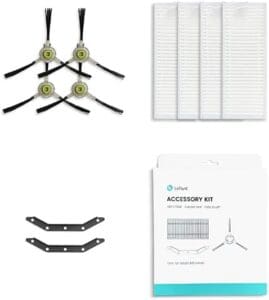
[/et_pb_cta][/et_pb_column][et_pb_column type=”1_3″ _builder_version=”4.27.2″ _module_preset=”default” global_colors_info=”{}”][/et_pb_column][et_pb_column type=”1_3″ _builder_version=”4.27.2″ _module_preset=”default” global_colors_info=”{}”][/et_pb_column][/et_pb_row][/et_pb_section][et_pb_section fb_built=”1″ custom_padding_last_edited=”on|desktop” prev_background_color=”#ffffff” admin_label=”Call to action” _builder_version=”4.16″ _module_preset=”71274510-c16b-4161-aafb-60955ad67d11″ use_background_color_gradient=”on” background_color_gradient_direction=”130deg” background_color_gradient_stops=”#3facff 25%|#0c71c3 100%” background_color_gradient_start=”#3facff” background_color_gradient_start_position=”25%” background_color_gradient_end=”#0c71c3″ background_image=”https://smartspaces.tech/wp-content/uploads/2024/11/marketing-bg6.png” parallax=”on” custom_padding=”16vw||0vw||false|false” custom_padding_tablet=”100px||100px||true” custom_padding_phone=”||||true” top_divider_style=”ramp2″ top_divider_height=”250px” top_divider_flip=”vertical” top_divider_height_tablet=”150px” top_divider_height_phone=”110px” top_divider_height_last_edited=”on|phone” saved_tabs=”all” global_colors_info=”{}” custom_margin=”-117px|||||”][et_pb_row module_class=” et_pb_row_fullwidth” _builder_version=”4.16″ _module_preset=”default” width=”89%” width_tablet=”80%” width_phone=”” width_last_edited=”on|desktop” max_width=”89%” max_width_tablet=”80%” max_width_phone=”” max_width_last_edited=”on|desktop” custom_margin_phone=”|||” custom_margin_last_edited=”off|desktop” custom_padding=”|||” make_fullwidth=”on” global_colors_info=”{}”][et_pb_column type=”4_4″ _builder_version=”4.16″ _module_preset=”default” custom_padding=”|||” global_colors_info=”{}” custom_padding__hover=”|||”][et_pb_text _builder_version=”4.16″ _module_preset=”default” text_font=”||||||||” header_font=”||||||||” header_2_font=”Roboto|700|||||||” header_2_font_size=”50px” header_2_line_height=”1.4em” header_3_font=”Roboto|700||on|||||” header_3_text_align=”center” header_3_text_color=”#ffffff” header_3_font_size=”24px” header_3_letter_spacing=”5px” header_3_line_height=”2em” text_orientation=”center” background_layout=”dark” max_width=”850px” module_alignment=”center” custom_margin=”|||” custom_padding=”|||” text_font_size_last_edited=”off|desktop” header_2_font_size_tablet=”40px” header_2_font_size_phone=”32px” header_2_font_size_last_edited=”on|desktop” header_3_font_size_tablet=”16px” header_3_font_size_phone=”14px” header_3_font_size_last_edited=”on|phone” global_colors_info=”{}”]
Ready To Live Smart?
Connect with your Smart Spaces Tech Team !
[/et_pb_text][et_pb_button button_url=”https://smartspaces.tech/consultation/” button_text=”Setup a Consultation” button_alignment=”center” _builder_version=”4.16″ _module_preset=”default” custom_button=”on” button_text_size=”14px” button_bg_use_color_gradient=”on” button_bg_color_gradient_direction=”90deg” button_bg_color_gradient_stops=”#f92c8b 0%|#b02cd6 100%” button_bg_color_gradient_start=”#f92c8b” button_bg_color_gradient_end=”#b02cd6″ button_border_width=”0px” button_border_color=”rgba(0,0,0,0)” button_border_radius=”4px” button_letter_spacing=”5px” button_font=”Roboto|700||on|||||” background_layout=”dark” custom_margin=”|||” custom_padding=”18px|34px|18px|34px|true|true” box_shadow_style=”preset3″ box_shadow_vertical=”20px” box_shadow_blur=”30px” box_shadow_spread=”-10px” box_shadow_color=”rgba(249,44,139,0.4)” button_letter_spacing_hover=”5.5px” global_colors_info=”{}” button_text_size__hover_enabled=”off” button_one_text_size__hover_enabled=”off” button_two_text_size__hover_enabled=”off” button_text_color__hover_enabled=”off” button_one_text_color__hover_enabled=”off” button_two_text_color__hover_enabled=”off” button_border_width__hover_enabled=”off” button_one_border_width__hover_enabled=”off” button_two_border_width__hover_enabled=”off” button_border_color__hover_enabled=”off” button_one_border_color__hover_enabled=”off” button_two_border_color__hover_enabled=”off” button_border_radius__hover_enabled=”off” button_one_border_radius__hover_enabled=”off” button_two_border_radius__hover_enabled=”off” button_letter_spacing__hover_enabled=”on” button_letter_spacing__hover=”5.5px” button_one_letter_spacing__hover_enabled=”off” button_two_letter_spacing__hover_enabled=”off” button_bg_color__hover_enabled=”off” button_one_bg_color__hover_enabled=”off” button_two_bg_color__hover_enabled=”off”][/et_pb_button][/et_pb_column][/et_pb_row][/et_pb_section]